

Automatically build and maintain a single, living asset inventory without the manual effort. No outdated records.








Track hardware, software, users, cloud assets, and even non-IP devices — all in one place.
Say goodbye to stale data. Keep your records clean with automated updates.
Push clean, enriched inventory data into your ITSM, security tools, and automation flows.
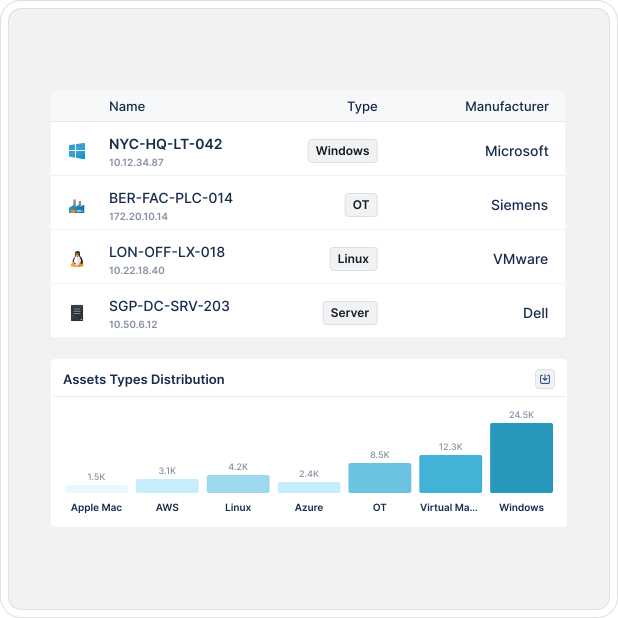
Unified Asset Inventory
Lansweeper’s Asset Inventory capability gives you a clean, centralized, and continuously updated record of every asset across your IT environment — from traditional hardware and installed software to cloud resources and remote endpoints.

Automated Discovery
Discovery feeds the asset inventory. Without complete discovery, your inventory is incomplete by design. Lansweeper’s Asset Inventory capability is powered by complete data from active scans, passive sensing, agent-based tracking, and cloud connectors — ensuring your inventory reflects reality.

Asset Intelligence
Lansweeper doesn’t just record assets. It builds deep, dynamic records that reflect your environment in full detail and context.

Data Integrity
Unlike basic inventory tools, Lansweeper automatically normalizes, deduplicates, reconciles, and classifies data at scale — eliminating manual cleanup and boosting CMDB accuracy from day one.

Insights
Your asset inventory fuels more than IT operations — it unlocks smarter business, security, and compliance decisions.

Connected Intelligence
From faster incident response to smarter procurement — discover how asset inventory drives real IT outcomes.
Connect with a wide range of IT systems to enrich your asset data and streamline processes.
Automate routine tasks and workflows, reducing manual effort so you can focus on higher-impact work.
USERS LOVE US




Explore the full platform, free for 14 days.
No credit card required.